
Vinyl Technical Features
Technical Flooring Resources for Architects, Designers and Installers
We provide easy access to all the technical documents, installation instructions, and specification sheets you need to ensure a flawless finish. Explore our advanced locking mechanisms and system technologies below.
Vinyl Flooring
SPC and LVT Flooring Technical Systems
Specify with confidence using our vinyl flooring technical library. Review each range by construction, wear layer, use classification, plank or tile dimensions, installation method, subfloor requirements, moisture performance and warranty.
Architects, interior designers, specifiers, contractors and installers can download the latest technical specification sheets, installation guides, warranty and maintenance documents, as well as Revit and BIM files to support accurate project specification, detailing and installation.
AURORA II
Straight Plank LVT Floor
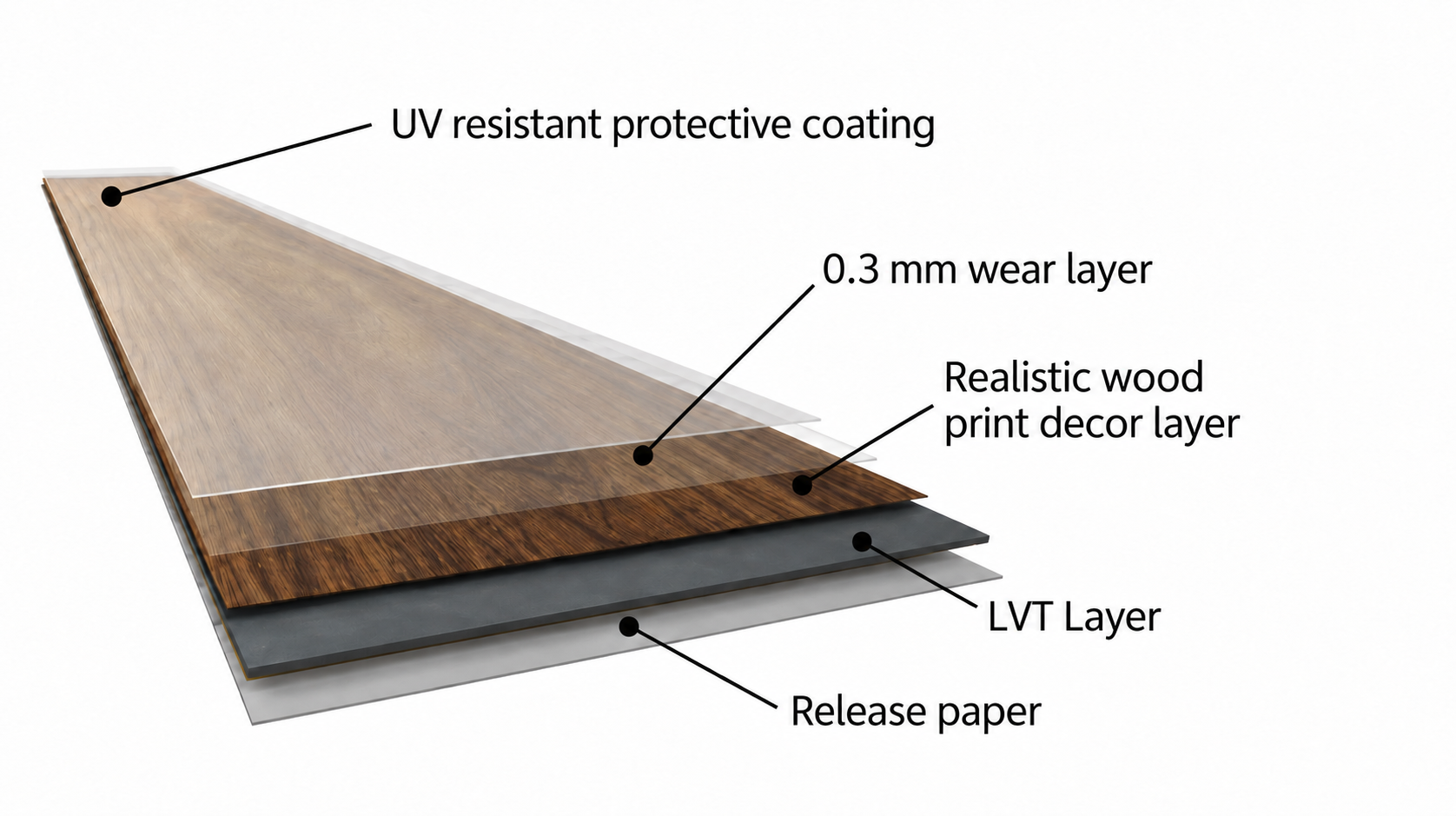
A 2 mm glue-down LVT with a 0.3 mm wear layer and a classic timber look.
AURORA II
Herringbone LVT Floor
Aurora II in a timeless herringbone format, ideal for adding pattern and character.

GALAXY II
Straight Plank LVT Floor
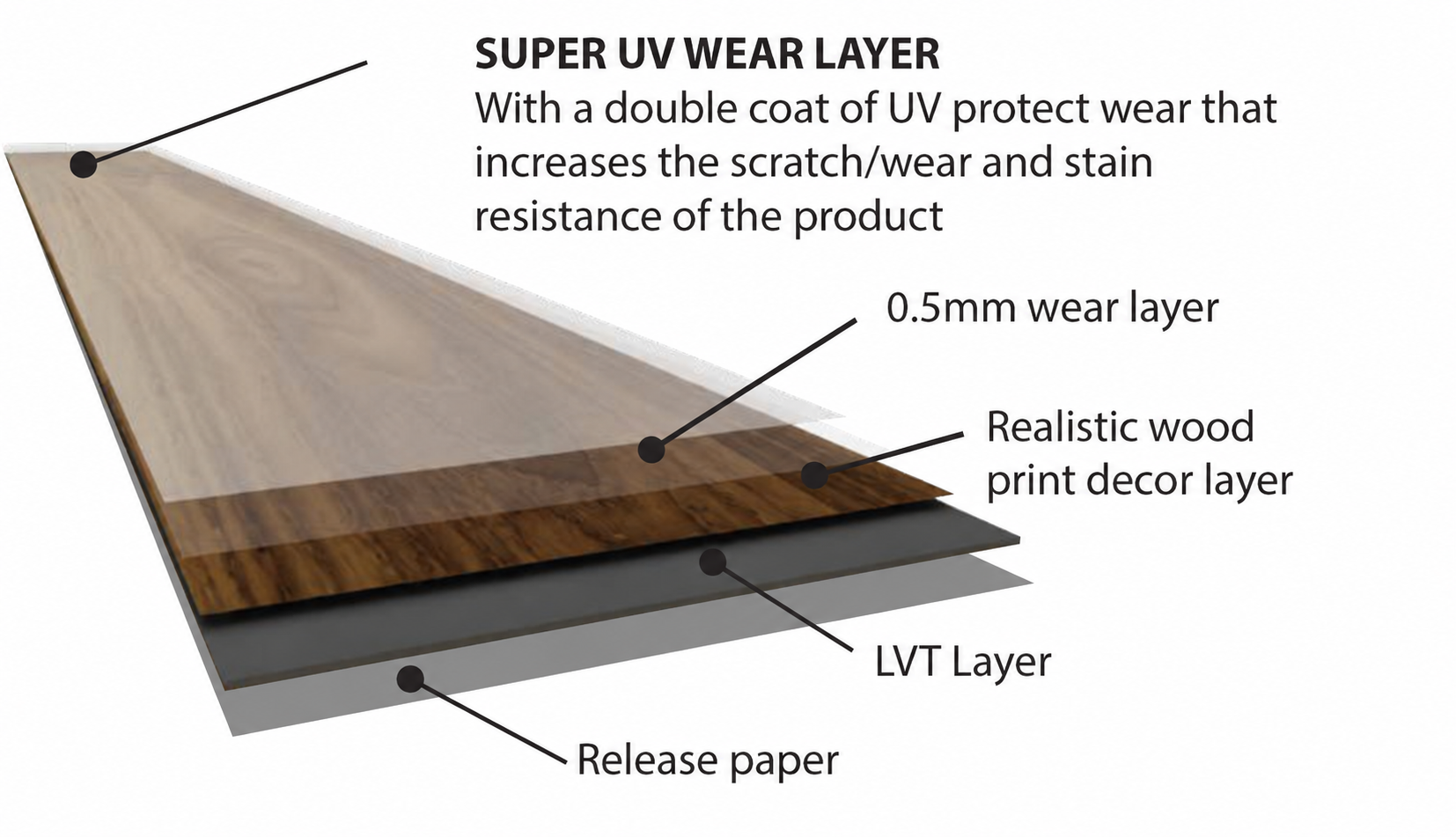
Durable 2.5 mm glue-down LVT with a 0.5 mm wear layer and Class 33 rating.

FINCRETE
LVT Floor
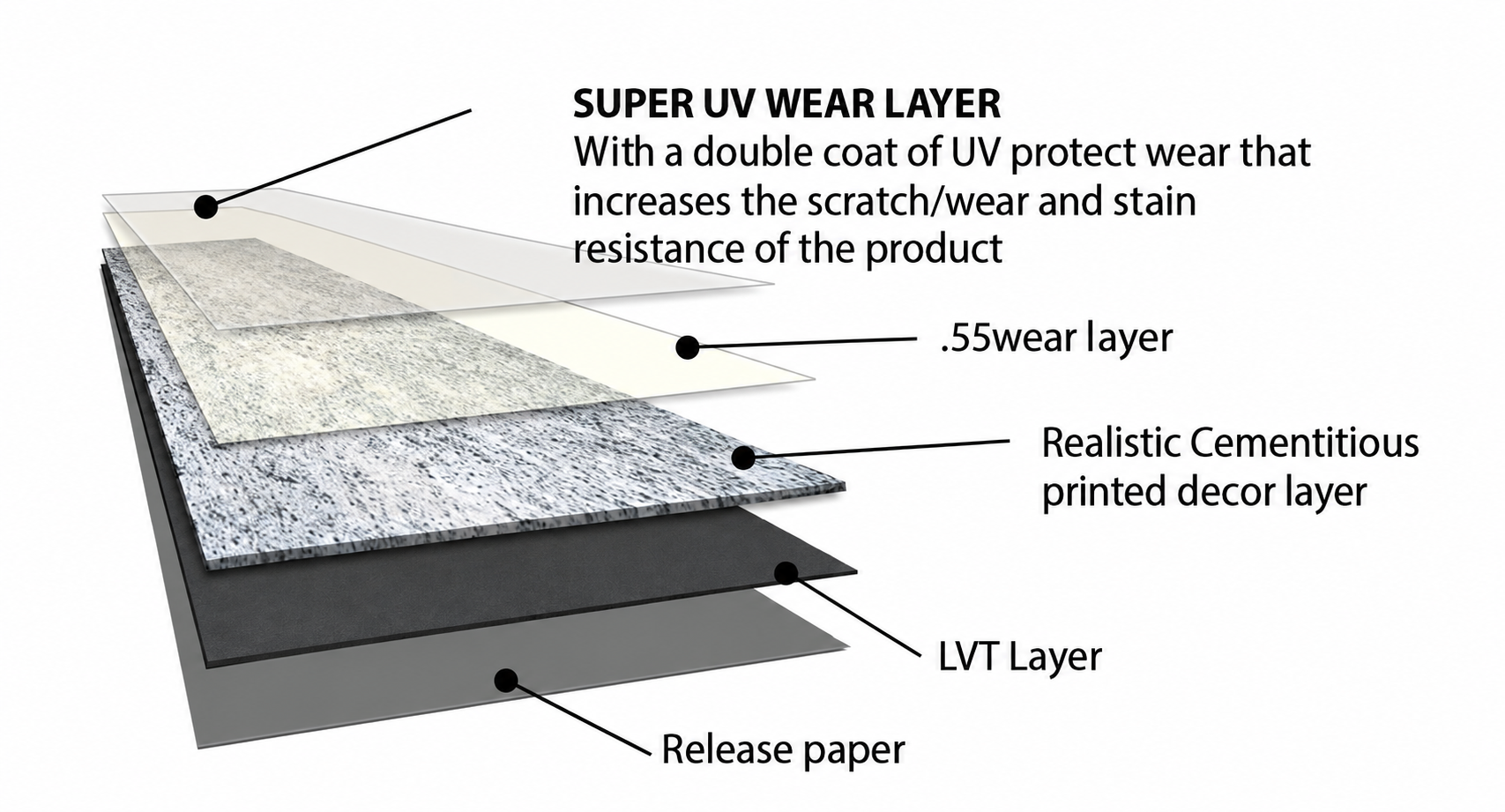
ontemporary stone-look LVT with a 0.55 mm wear layer and Class 33 rating.

Diamond Core
SPC VINYL Floor
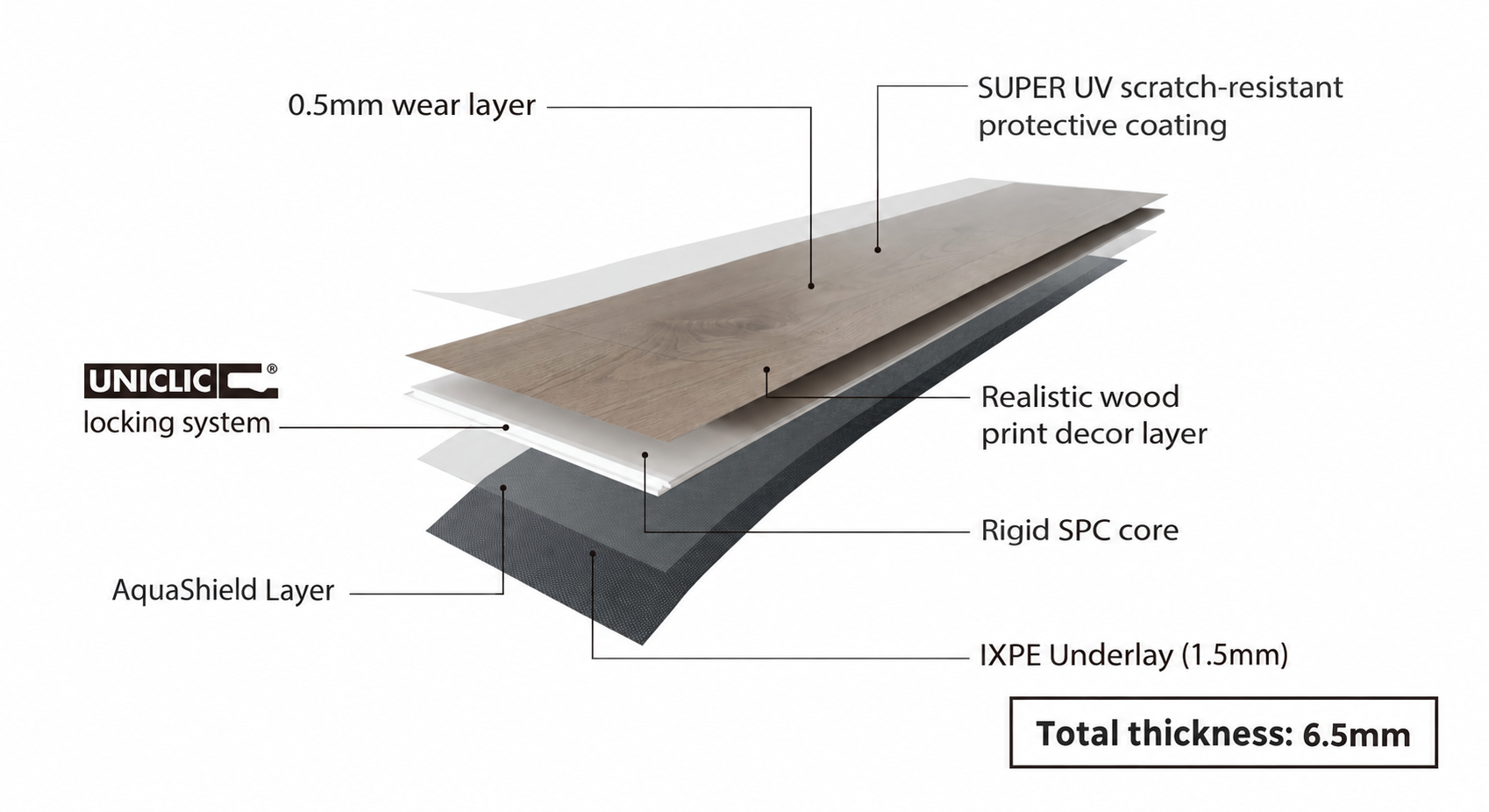
Rigid-core SPC with a 0.5 mm wear layer, integrated underlay and Aqua Shield tech.
SAPPHIRE WIDE
SPC VINYL Floor
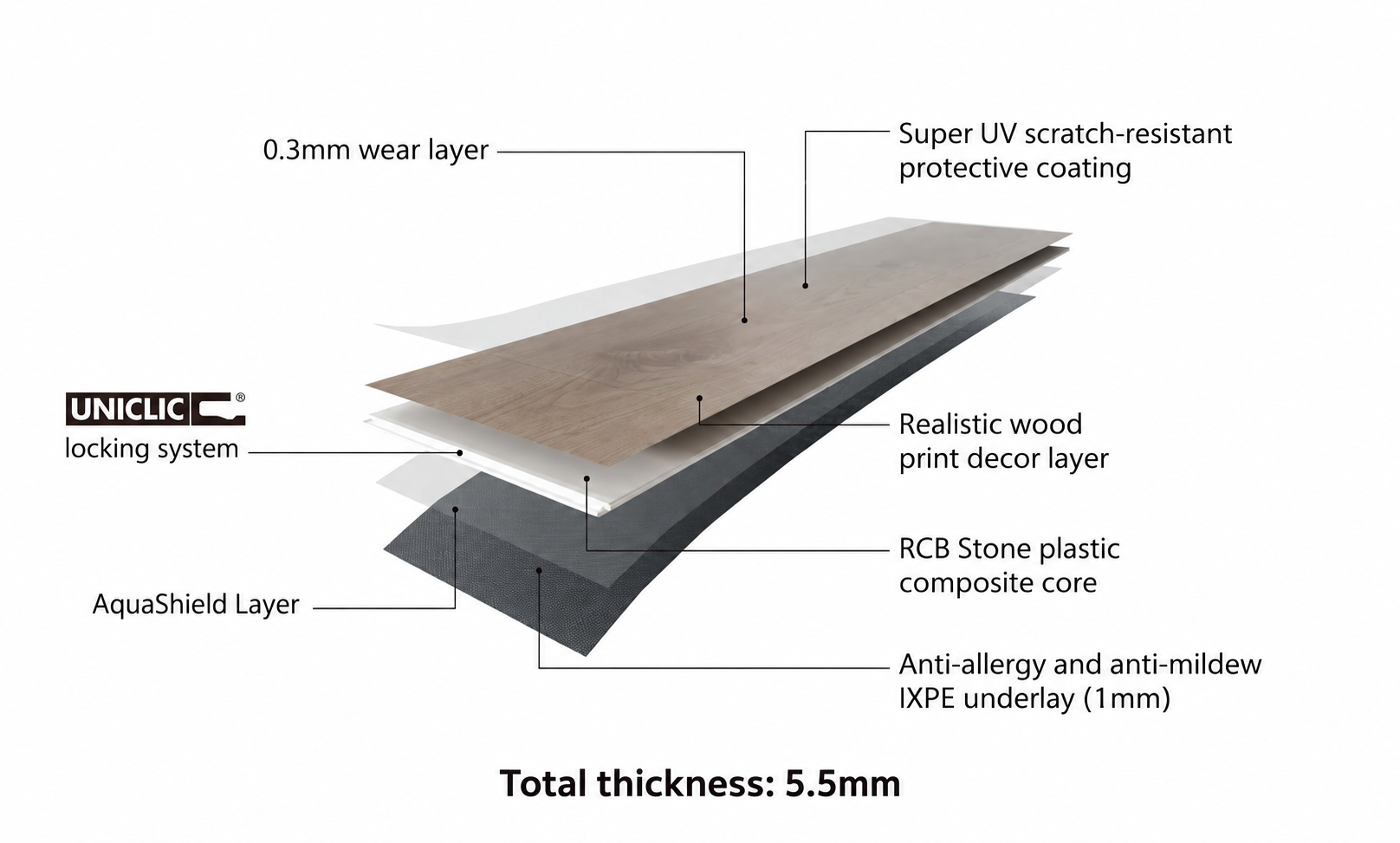
Wide-plank SPC with an integrated underlay and Uniclic locking system.
How to Specify Vinyl Flooring: LVT and SPC
A good vinyl flooring specification identifies the exact product system and how it will perform in the space. Compare glue-down luxury vinyl tile (LVT) with rigid-core SPC, then confirm the wear layer, use classification, installation method, subfloor requirements, moisture conditions, accessories and warranty for the selected range.
| Specification Point | Glue-Down LVT | Click SPC |
|---|---|---|
COREConstruction |
Flexible, dry-back vinyl plank or tile adhered to the prepared subfloor. FINfloor examples include timber-look planks and the tile-format FINCrete range. | Rigid stone-plastic composite core installed as a floating, click-lock floor. FINfloor ranges include Diamond Core SPC+ and Sapphire SPC Wide. |
MMThickness and build-up |
Confirm product thickness, adhesive and any levelling compound or floor-preparation layers. FINfloor glue-down products vary by range and format. | Check total plank thickness and whether an attached underlay is included. Do not add a separate underlay unless the product instructions allow it. |
WEARWear layer |
Specify the chosen product’s wear-layer thickness and surface treatment. FINfloor examples range from Aurora II at 0.3 mm to FINCrete at 0.55 mm. | Confirm the selected series: Sapphire SPC Wide has a 0.3 mm wear layer and Diamond Core SPC+ has a 0.5 mm wear layer. |
USEUse classification |
Match the product’s stated use class to expected traffic. Aurora II is rated for heavy domestic and light commercial use; Galaxy II is specified for heavy commercial use. | Check the selected SPC range’s application rating and warranty. Rigid-core construction or a thicker plank does not by itself establish a traffic class. |
FIXInstallation method |
Specify glue-down installation using the approved adhesive and instructions. Include subfloor preparation and curing requirements. | Specify floating click installation, expansion clearances, permitted room dimensions and transition details from the relevant installation guide. |
BASESubfloor |
The subfloor must meet product requirements for flatness, smoothness, cleanliness and dryness. Irregularities can show through the finished floor. | Confirm the subfloor is sound, flat, clean and dry, and that variation is within the product’s stated tolerance. |
H₂OMoisture |
A vinyl surface may be described as waterproof, but this does not remove the need to test and manage subfloor moisture before bonding. | Topical-water resistance does not protect the floor from water entering beneath it. Check guidance for moisture, perimeter sealing and wet-area limitations. |
SOUNDAcoustics and underlay |
Include acoustic or impact-sound requirements in the floor build-up. Glue-down LVT does not use added underlay unless the approved system says otherwise. | Some ranges have attached IXPE underlay. Confirm the acoustic data and whether additional underlay is permitted for that product. |
✓Warranty and care |
Check residential or commercial warranty, approved adhesive, installation conditions and maintenance requirements for the chosen LVT. | Check warranty by application, installation conditions, expansion details and maintenance guidance for the selected SPC range. |
BIMBIM object |
Choose a model matching the product range, plank or tile format, finish and thickness. Open a FINfloor BIM product link below. | Select the matching SPC product object and file type from its BIM4U product page. Check the model description before adding it to Downloads. |
Before You Finalise a Vinyl Specification
Name the FINfloor range and décor, and review its current technical sheet, installation guide, warranty and maintenance instructions. Check that the specification reflects the room conditions and required performance. Do not assume all LVT or SPC products share the same thickness, wear layer, classification or warranty.
What to Include in a Vinyl Flooring Specification
1. Identify the Flooring Type and Exact Product
State whether the design calls for glue-down LVT or floating click SPC. Then name the FINfloor collection, décor, plank or tile format, overall thickness, wear-layer thickness and edge finish. A clear product reference helps the contractor price and install the intended flooring.
2. Match Wear Layer and Use Class to the Space
The wear layer is one part of a product’s performance. Read it alongside the published fit-for-use classification, expected traffic, maintenance plan and warranty. Use the current technical documentation for the exact product; do not choose by wear-layer thickness alone.
FINfloor vinyl options serve different applications. Aurora II glue-down LVT is listed for heavy domestic and light commercial use, Galaxy II for heavy commercial interiors, while SPC ranges have their own application ratings and warranty terms. Confirm suitability for the project’s actual use before the schedule is issued.
3. Specify the Installation System
Glue-down LVT depends on correct subfloor preparation, compatible adhesive, installation conditions and curing time. Floating SPC depends on a suitable click-lock installation, expansion clearances and transitions. Include the applicable FINfloor installation instructions in the tender or construction documents.
4. Check the Subfloor and Moisture Conditions
A vinyl floor’s surface may resist topical water, but the finished floor still relies on a suitable substrate. Assess flatness, smoothness, soundness and moisture in accordance with the chosen product’s instructions. Correct unevenness and resolve moisture sources before installation, especially for adhesive-applied LVT.
5. Coordinate the Full Floor Build-Up
Include trims, transitions, skirtings, adhesive, levelling materials, acoustic requirements and floor-height changes at doorways. For SPC with attached IXPE, check whether an extra underlay is prohibited or unnecessary. Coordinate adjacent finishes and movement requirements with the installation documentation.
6. Verify Performance and Warranty Requirements
For commercial or public projects, confirm requirements for fire performance, slip resistance, acoustic performance, emissions, underfloor heating and cleaning. Request supporting documents where the project requires them. Review the warranty’s intended-use category and conditions before selecting the product.
Why Use FINfloor BIM Files?
BIM objects help architects and interior designers place the selected flooring product into a digital project model. Choose the BIM object that corresponds to the specified range and review its dimensions and description. On BIM4U, select an available file type and add the model to your downloads.
Download FINfloor Vinyl BIM Files
Select the BIM object that matches the flooring in your specification. Each link opens its BIM4U product page, where available file types can be selected and added to Downloads.
SPC: Diamond Core SPC+ BIM file; Sapphire SPC Wide BIM file.
Glue-down LVT: Galaxy II BIM file; FINCrete BIM file; Aurora II BIM file.
Specify FINfloor Vinyl with Confidence
A dependable vinyl specification connects the product choice to the project’s traffic, subfloor, installation method and performance needs. Use FINfloor’s product information and BIM resources to make the selection clear to the design and installation teams.
Product Specification
Confirm construction, dimensions, wear layer and finish.
Installation Guide
Check subfloor preparation, adhesive or click method and clearances.
Warranty
Match product cover to the intended residential or commercial use.
Maintenance
Follow the care guidance for the chosen vinyl surface.
BIM Download
Use the BIM object for the specified FINfloor LVT or SPC range.
For product-specific support, consult the current FINfloor technical information and speak to your FINfloor representative or stockist.
Get Expert Support
Need Help Choosing the Right Technical System?
Speak to the FINfloor team for support with product specifications, installation guidance, and technical flooring requirements for your next project.